You check your website analytics. You see a massive spike in traffic. However, the source simply says “Direct.” Therefore, you have no idea which marketing campaign actually worked. UTMs
This is a common frustration for marketers. You spend money on ads, emails, and social posts. Consequently, you need to know exactly which ones drive results. If you cannot track your clicks, you are basically flying blind.
This post will solve that problem. Welcome to UTMs Explained: A Beginner’s Guide to Tracking Links. You will learn exactly how to tag your URLs. As a result, you will never lose track of a successful campaign again.
You will discover what utms are and how they function. Furthermore, we will show you how to build them step by step.

What is UTMs Explained: A Beginner’s Guide to Tracking Links?
You might be wondering what these letters actually mean. UTM stands for Urchin Tracking Module. The name comes from an old software company. Google bought this company back in 2005. This software eventually became Google Analytics.
A UTM parameter is simply a short piece of text. You attach this text to the end of a URL. This text tells your analytics platform exactly where a visitor came from.
For example, you might share a link on Facebook. You can add a specific tag to that link. When someone clicks it, Google Analytics records the exact source. Therefore, you know the click came from Facebook.
Business owners, marketers, and content creators should use these tags. In addition, anyone running paid ads must use them. They remove the guesswork from marketing.
Why accurate data matters for marketing
Key Features of UTMs Explained: A Beginner’s Guide to Tracking Links
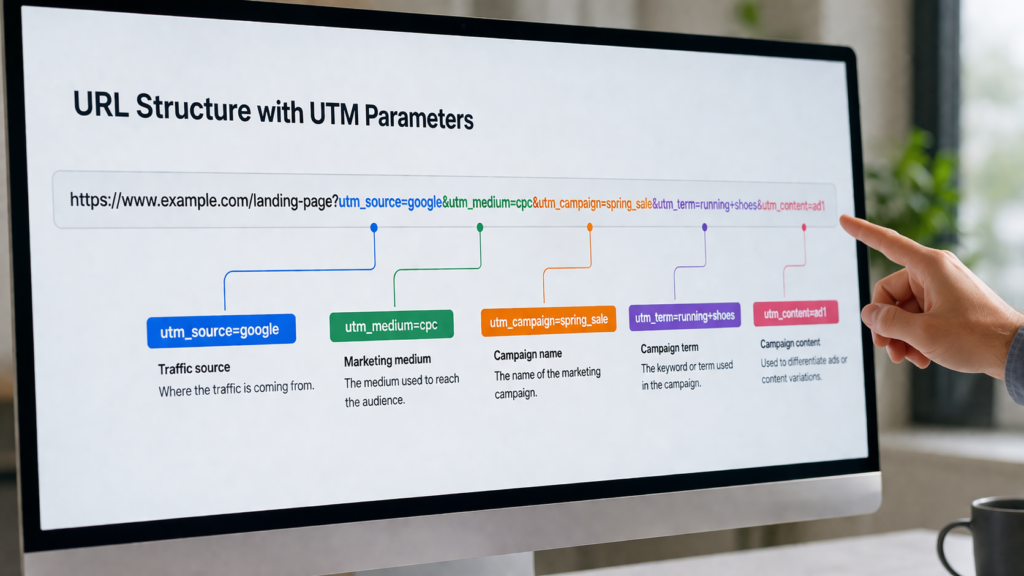
Understanding the structure is very important. There are five main parameters you can use. Three are required, and two are optional.
- Campaign Source (utm_source): This shows the specific platform. Examples include Google, Facebook, or a newsletter.
- Campaign Medium (utm_medium): This identifies the marketing channel. Examples include email, social, or cost-per-click (cpc).
- Campaign Name (utm_campaign): This names your specific promotion. Examples include spring_sale or product_launch.
- Campaign Term (utm_term): This is an optional tag. Marketers use it to track paid search keywords.
- Campaign Content (utm_content): This is also optional. You use it to test different ads or buttons. For instance, you can track a red button versus a blue button.
How to Use UTMs (Step-by-Step Guide)
Building tracking links is easy once you know the steps. You do not need any coding skills. Follow this simple process.
Step 1: Choose Your Tool
Do not build these links manually. Typing them out often leads to typos. Instead, use a free generator tool. Google offers a free Campaign URL Builder. Alternatively, you can use specialized software for larger teams.
Step 2: Fill in the Blanks
Enter your destination URL first. This is the page you want people to visit. Next, fill in your source, medium, and campaign name. Keep everything lowercase to avoid data errors in Google Analytics.
How to set up Google Analytics 4
Step 3: Copy and Share
The tool will generate a long link for you. Copy this new URL. Finally, paste this link into your email, social post, or ad. When people click it, the tracking begins automatically.
Benefits and Use Cases
Tracking your links provides massive advantages. The biggest benefit is clear marketing attribution. You will know exactly which channels generate revenue.
For example, imagine you run a holiday sale. You send an email, post on Twitter, and run Google Ads. Without tracking, the sales all mix together. However, with tracking tags, you see exactly what worked.
Perhaps the email generated fifty sales. Meanwhile, the Twitter post generated zero. As a result, you know to focus on email next time.
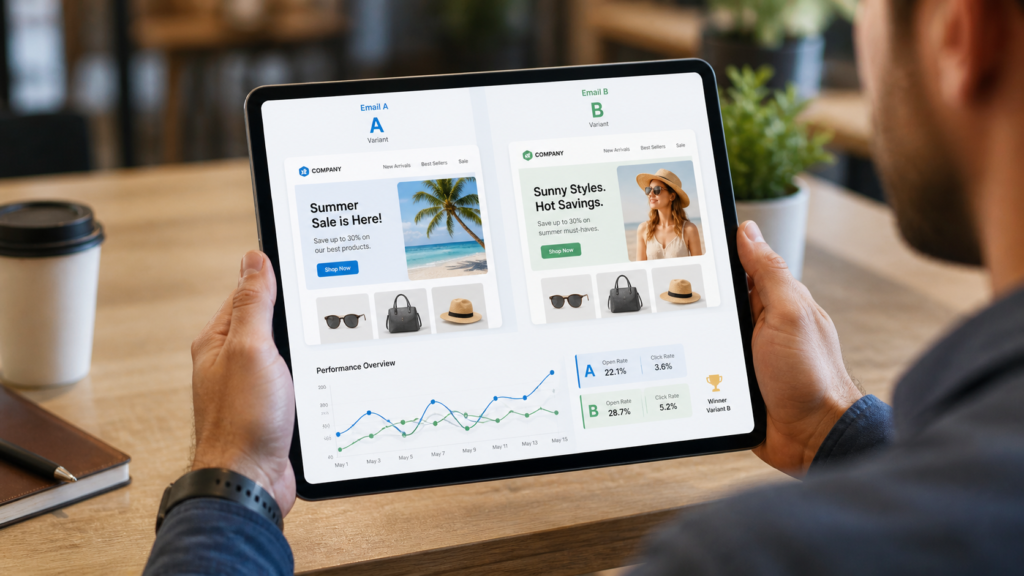
Another great use case is A/B testing. You can send two different emails. By using the content tag, you track which email gets more clicks. Therefore, you learn what your audience prefers.
Guide to A/B testing your emails
Pros and Cons
Like any marketing strategy, there are distinct advantages and disadvantages. You should understand both sides.
Pros
- Accurate Data: You get precise tracking for every single campaign.
- Cost Nothing: Building these links is completely free.
- Easy to Learn: Anyone can create them in just a few seconds.
- Universal Use: They work with almost all analytics platforms.
Cons
- Messy URLs: The links are very long and look ugly to users.
- Data Loss: If users copy and share the link without the tags, tracking stops.
- Human Error: Typos can easily fragment your data reports.
- No Internal Use: You cannot use them for internal website links.
Best Alternatives
Sometimes, these tags are not the perfect fit. There are a few other methods you can explore.
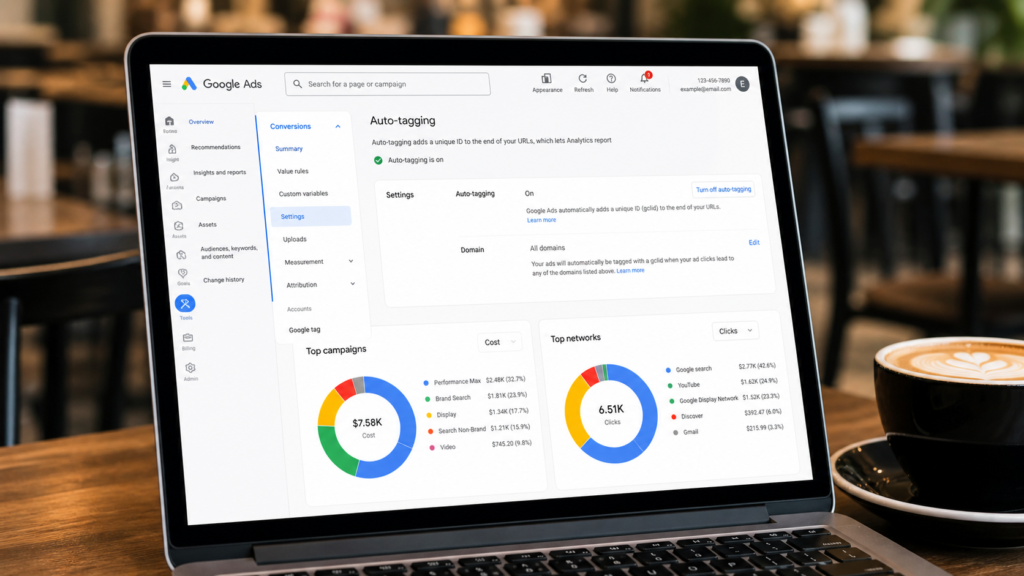
First, you can use auto-tagging. If you run Google Ads, this is highly recommended. Google automatically attaches an ID to your links. Consequently, you do not have to build them manually.
Second, consider using a URL shortener with built-in analytics. Platforms like Bitly can track clicks for you. This solves the problem of long, ugly links.
Third, you can use specialized conversion tracking software. These tools use server-side tracking. Therefore, they do not rely on browser cookies. This is a more advanced option for large companies. You can read more about standard tracking on the official Google Analytics documentation.
Common Mistakes to Avoid
Many beginners make critical errors when starting out. You can easily avoid these traps.
Do not use capital letters. Google Analytics is case-sensitive. Therefore, “Email” and “email” will show up as two different sources. Always use lowercase letters for consistency.
Never use spaces in your parameters. Spaces will break the link completely. Instead, use hyphens or underscores. For instance, write “spring_sale” instead of “spring sale.”
Do not use these tags on internal links. An internal link points from one page on your site to another. If you tag it, Google Analytics will restart the user’s session. This ruins your analytics data.
Common SEO mistakes to avoid
FAQs
What happens if I make a typo in the tag?
A typo will create a new, separate line in your analytics report. For example, if you type “gogle” instead of “google,” your data gets split. This makes reporting very difficult.
Do these tags affect my search engine ranking?
No, they do not impact SEO at all. Search engines ignore the parameters when crawling your page. However, you should set up canonical tags to prevent duplicate content issues.
Can users see the tags?
Yes, the parameters are completely visible in the browser address bar. Therefore, you should never put sensitive information inside them.
Do I need a special tool to read the data?
No, most analytics platforms read them automatically. Google Analytics handles them by default. You just need to check your Acquisition reports to see the results.
How to read Acquisition reports in GA4

Final Thoughts on Tracking Your Links
Marketing without tracking is just guessing. You need accurate data to grow your business. Therefore, understanding your traffic sources is absolutely critical.
We hope you enjoyed UTMs Explained: A Beginner’s Guide to Tracking Links. You now know exactly what these parameters are. Furthermore, you know how to build them without making common mistakes.
Start using them on your next campaign. Create a simple naming system and stick to it. As a result, your analytics will become crystal clear.
Ready to take control of your data? Try using a free URL builder today. Start tagging your social posts and emails immediately. Your future self will certainly thank you.